
WordPress Accessibility
Why Accessibility Matters in WordPress

Tags:
The modern web was built on a foundational promise: universal access to information regardless of hardware, software, language, or physical ability. As the content management system powering over 40% of all websites on the internet, WordPress carries a massive share of the responsibility for fulfilling that promise. Every theme selected, plugin installed, and line of code written shapes how millions of users—including those who rely on screen readers, keyboard-only navigation, or dynamic text scaling—experience the digital world.
Yet, web accessibility (a11y) is frequently relegated to an afterthought or mistaken for an optional feature reserved for large enterprise sites. In reality, accessible web design is fundamental to digital equity, legal compliance, user experience, and search performance. When creators design with accessibility in mind, they do not just accommodate users with disabilities—they build cleaner, more robust, and more intuitive websites for everyone.
Understanding accessibility within the WordPress ecosystem requires looking beyond basic design choices to examine theme architecture, content creation workflows, and plugin selection. Making your WordPress site accessible is not just a technical checklist; it is an active commitment to building an inclusive web.
New rules - European Accessibility Act (EAA)
For years, web accessibility legislation in Europe primarily targeted public sector websites and government bodies. However, the landscape shifted dramatically with the European Accessibility Act (EAA / Directive 2019/882), which entered into full enforcement across all 27 EU member states on June 28, 2025.
Unlike previous regulations, the EAA mandates strict digital accessibility standards for the private sector. If a business sells goods or services to consumers within the EU, its digital channels—including its WordPress website, mobile apps, and online store—must be accessible to everyone, regardless of where the business itself is headquartered.
EAA aims to make goods and services more accessible to approximately 25% of EU residents with disabilities, accounting for over 100 million people. But accessibility can be more than growing your audience: it can improve SEO, boost brand awareness, be cost-effective, and offer a competitive advantage.
What are the requirements of EAA?
- WCAG 2.1 Level AA standards compliance - Although never directly specified, the requirements closely resemble the WCAG 2.1 Level AA standards, which have been set for a while and are the basis for accessibility in web development.
- Compatibility with assistive technologies - Such as screen readers, magnifiers, and voice recognition software, should be thought about and tested while building/improving the website.
- User Feedback - The end user should be able to easily report accessibility issues on the platform.
Shift-Left: Integrating Accessibility Throughout the WordPress Lifecycle
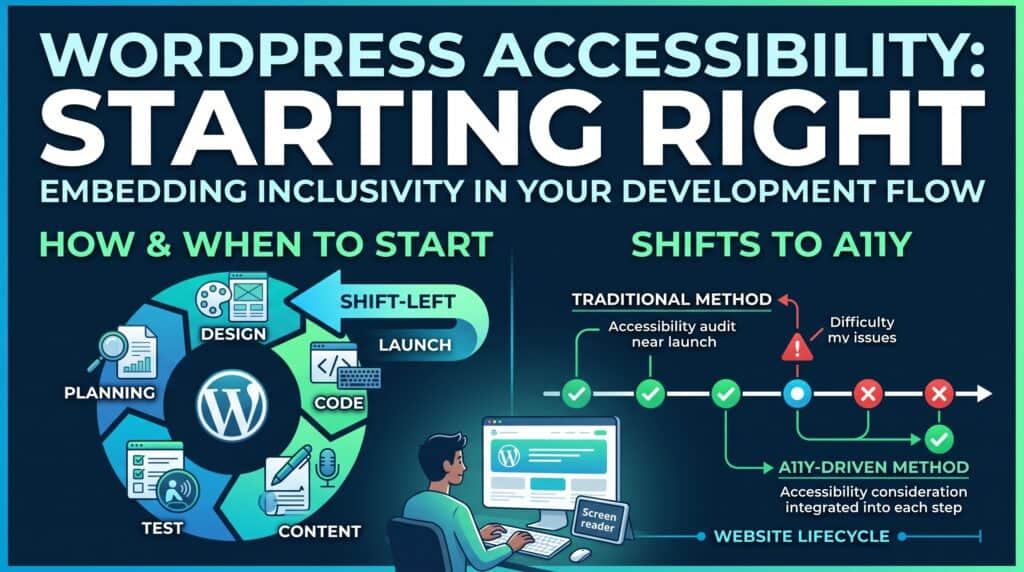
One of the most expensive mistakes in web development is treating accessibility as a final polishing step before launch—or worse, a task to address after receiving a compliance warning.
When accessibility is deferred until the end, fixing core architectural issues (such as inaccessible navigation structures, improper color palettes, or incompatible page builders) often requires rebuilding large portions of the site. According to industry estimates, retrofitting accessibility post-launch can cost up to 10 times more than integrating it from day one.
To build an inclusive WordPress site efficiently, teams must adopt a “Shift-Left” approach—embedding accessibility considerations into every phase of the project lifecycle.
The future - Is your website WCAG 2.2 ready?
WCAG 2.2 is supposed to be backwards compatible. Meaning that if your website is 2.2 ready, it also is 2.1. However, the contrary is not true; your website might be WCAG 2.1 and not be 2.2 compatible. Here are the main differences between the two:
- Focus Not Obscured (Minimum) (AA) - When a user interface component receives keyboard focus, the component is not entirely hidden due to author-created content.
- Focus Not Obscured (Enhanced) (AAA) - When a user interface component receives keyboard focus, no part of the component is hidden by author-created content.
- Focus Appearance (AAA) - The best way to achieve this is to have a perimeter around the element of at least 2px and with sufficient contrast ratio.
- Dragging Movements (AA) - All functionality that uses a dragging movement for operation can be achieved by a single pointer without dragging, unless dragging is essential or the functionality is determined by the user agent and not modified by the author.
- Target Size (Minimum) (AA) - The size of the target for pointer inputs is at least 24 by 24 CSS pixels (with some exceptions).
- Consistent Help (A) - If your website offers a help mechanism (for instance, a link), make sure that it is always in the same position.
- Redundant Entry (A) - Information previously entered by or provided to the user that is required to be entered again in the same process is either auto-populated or available for the user to select.
- Accessible Authentication (Minimum) (AA) - With some exceptions, cognitive tests such as recatpchas shouldn’t be required in an authentication process.
- Accessible Authentication (Enhanced) (AAA) - Expands on the previous point with fewer exceptions.
Need Expert Guidance?
If you want to fast-track your path to compliance, avoid costly design retrofits, or ensure your site meets EAA and WCAG standards without sacrificing visual appeal, expert help is available.
In my upcoming follow-up article, I share my hands-on framework as a freelance WordPress accessibility specialist. I break down how I conduct comprehensive site audits, remediate complex plugin issues, and train editorial teams to maintain compliance long after launch. Stay tuned to discover how we can work together to make your digital presence accessible to everyone.
0 Comments
Share a Comment