
WCAG / EAA / ADA Specialist
How to Hire a WCAG Specialist to Make Your WordPress Site Fully Accessible
Tags:
In our previous article, Why Accessibility Matters in WordPress, we explored the foundational reasons why inclusive design is no longer optional—from expanding your market reach and sharpening site SEO to safeguarding your business against looming compliance deadlines. While recognizing the legal and financial necessity of WCAG compliance is a vital first step, bridging the gap between awareness and implementation is where most site owners get stuck. Transitioning a complex, dynamic WordPress ecosystem into a fully accessible platform requires far more than good intentions; it demands specialized technical execution that standard off-the-shelf templates and automated tools simply cannot deliver.
Building a truly inclusive web experience goes well beyond choosing an "accessibility-ready" theme or installing a quick-fix plugin. Because WordPress relies heavily on a web of third-party plugins, custom code blocks, and dynamic page builders, achieving true compliance requires deep, hands-on remediation of your site's underlying architecture. To navigate these technical complexities effectively, working with a dedicated freelance digital accessibility consultant who understands both assistive technologies and core WordPress development is essential. Whether you need a comprehensive audit or direct code remediation, knowing how to find and hire a WCAG specialist can mean the difference between a band-aid fix and a resilient, fully compliant digital product.
Table of contents
- Why Off-the-Shelf WordPress Themes and Plugins Aren't Enough
- The 4-Step Process of a Professional Accessibility Audit & Remediation
- Key Qualifications to Look for When You Hire a WCAG Specialist
- Protect and Upgrade Your Site Today
- Frequently Asked Questions
Why Off-the-Shelf WordPress Themes and Plugins Aren't Enough
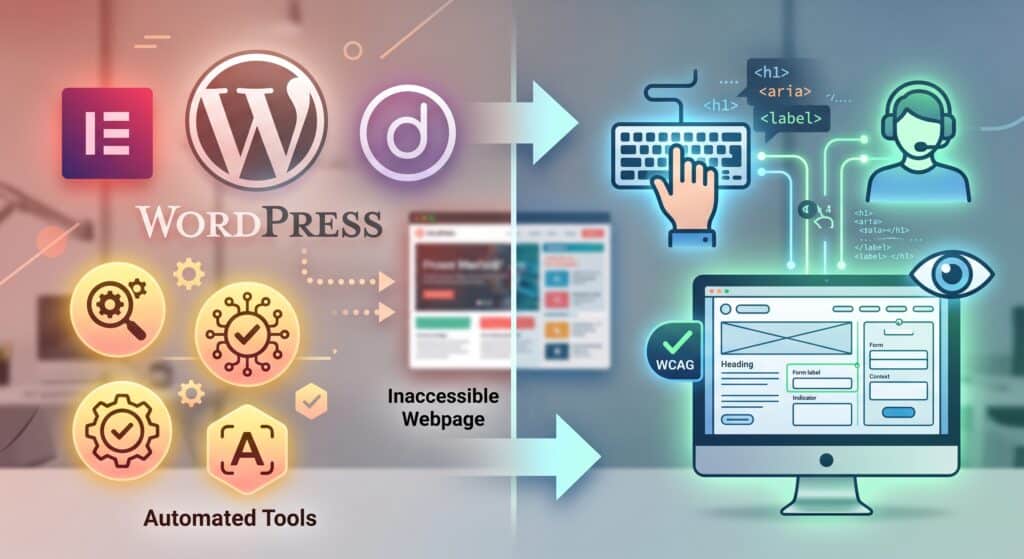
As a freelance digital accessibility consultant, my role goes beyond running automated scans; it focuses on delivering complete, end-to-end site remediation. While automated scanning tools are useful for catching high-level issues like missing image alt attributes or contrast failures, achieving true compliance requires hands-on testing. I combine automated reporting with manual screen reader evaluation—using tools like NVDA, JAWS, and VoiceOver—to test every user flow, ensuring your site is entirely usable for people relying on assistive technologies.
Behind the scenes, I clean up and restructure your custom theme's code to align with modern web standards. This involves stripping away non-semantic HTML, setting up proper ARIA landmarks so screen reader users can navigate directly to key content, and ensuring every interactive element is fully reachable and controllable via keyboard navigation. By building logical focus indicators and proper DOM structures into your custom WordPress templates, your design remains visual while becoming completely navigable for everyone.
Finally, I specialize in remediating the most technically challenging interactive elements across your WordPress environment. Whether it's making custom contact forms accessible, ensuring slide-out mobile menus don't trap keyboard focus, making modal popups dismissible, or streamlining complex multi-step WooCommerce checkouts, I ensure every critical conversion step works flawlessly. If you need an accessibility specialist for hire to turn complex site mechanics into inclusive user experiences, I bridge the gap between compliance requirements and functional code.
The 4-Step Process of a Professional Accessibility Audit & Remediation
1. Initial Discovery & Automated Scans
Every project begins with a baseline assessment to uncover high-level accessibility bottlenecks across your site. Using industry-standard automated scanners, I map out your website's architecture, identify site-wide patterns, and flag immediate low-hanging fruit—such as color contrast failures, missing image alt attributes, and structural heading errors. This initial scan creates a targeted roadmap for deeper technical evaluation.
2. Manual Expert Auditing
Because automated tools miss the majority of WCAG failures, I perform comprehensive manual testing across your core user journeys. As part of my accessibility audit services, I evaluate your custom templates using keyboard-only navigation and screen readers like NVDA and VoiceOver. I test real-world interactions—like submitting a contact form, filtering products, or checking out—to ensure your site offers a seamless experience for every user.
3. Code Remediation & Custom Development
Once issues are cataloged, I move directly into your codebase to apply clean, sustainable fixes. Rather than applying surface-level patches, I refactor template files, write custom hooks, adjust theme styling, and resolve plugin conflicts directly within your WordPress setup. Working as a dedicated WordPress ADA/EAA compliance specialist, I ensure that accessibility becomes a native, non-breaking part of your site's underlying code.
4. Validation & Compliance Documentation
After remediation is complete, I conduct a final round of validation testing to verify that all code updates meet strict WCAG standards. To wrap up the engagement, I provide detailed compliance documentation, including a clear audit report and, if needed, an Accessibility Conformance Report (ACR/VPAT). This documentation serves as tangible proof of your commitment to inclusion and protects your business against legal exposure.
Key Qualifications to Look for When You Hire a WCAG Specialist
Deep Understanding of WCAG 2.1 / 2.2 Standards
When searching to hire a WCAG specialist, ensure they have an in-depth, practical grasp of the Web Content Accessibility Guidelines (WCAG 2.1 and 2.2 AA levels). An expert doesn't just memorize criteria—they know how guidelines translate into real-world front-end code, contrast ratios, touch targets, and dynamic content behaviors across different screen sizes.
Proficiency with Assistive Technologies
A true specialist spends significant time testing websites using native screen readers like NVDA, JAWS, and Apple's VoiceOver, alongside keyboard-only navigation workflows. When evaluating a specialist, confirm they test directly with assistive devices rather than relying strictly on automated browser extensions or simulated audit scores.
Deep WordPress Architecture & Development Expertise
Remediating a WordPress site requires far more than generic HTML/CSS knowledge. The right candidate must understand core WordPress functions, the hook and filter system, custom template hierarchy, and how modern block editors or page builders generate DOM structures. This technical depth ensures their fixes are clean, maintainable, and won't break during future core updates.
Familiarity with Global Compliance Frameworks
Finally, an effective ADA compliance consultant for websites should understand the legal landscape driving accessibility mandates. Look for a specialist who understands global legal standards, including Section 508, the Americans with Disabilities Act (ADA), and the European Accessibility Act (EAA), ensuring your site's code meets the specific legal thresholds relevant to your business market.
Protect and Upgrade Your Site Today
Achieving full digital accessibility isn't just about avoiding lawsuits or meeting international mandates like the EAA—it’s about building a superior, frictionless web experience that welcomes every potential customer to your business. If you're ready to clear away compliance guesswork and ensure your WordPress platform is accessible to all, let's work together. As an experienced freelance digital accessibility consultant, I provide comprehensive accessibility audit services and direct code remediation tailored to your technical stack. Reach out today to book an initial consultation or request a custom WordPress accessibility audit to protect your business and elevate your site's UX.
Frequently Asked Questions
Can’t I just install a free or paid WordPress plugin to make my site compliant?
No. While automated accessibility plugins and overlays promise a quick fix, they can only detect and remediate roughly 30% of WCAG guidelines. Overlays cannot evaluate logical reading order, fix complex custom interactions, or ensure screen readers properly announce dynamic elements like WooCommerce checkouts. In fact, relying on overlays often increases legal exposure because accessibility advocates and legal teams recognize them as incomplete solutions. Genuine compliance requires manual code remediation within your theme and plugins.
How long does a manual WordPress accessibility audit and remediation take?
Timeline depends on the size and technical complexity of your WordPress website. A standard marketing or business site typically takes 1 to 2 weeks for a thorough manual audit and initial report. Complete code remediation—fixing theme templates, ARIA attributes, forms, and keyboard navigation—usually takes an additional 2 to 4 weeks. E-commerce platforms or custom-built web apps may require more extensive testing.
Will making my WordPress site accessible break my design or layout?
Not at all. Professional digital accessibility remediation focuses on the underlying codebase, semantic HTML, keyboard focus management, and hidden ARIA labels. While minor visual adjustments may be needed to satisfy color contrast ratios or focus ring visibility, your site’s core visual branding, layout, and user experience will remain intact—and become much cleaner and easier to navigate for all users.
What is the difference between WCAG, ADA, and EAA?
- WCAG (Web Content Accessibility Guidelines): The international technical standard (currently version 2.2 AA) that defines how to make digital content accessible.
- ADA (Americans with Disabilities Act): U.S. legislation requiring businesses to provide equal access, with courts using WCAG 2.1/2.2 AA as the legal baseline for websites.
- EAA (European Accessibility Act): European Union legislation enforcing digital accessibility standards across products and services sold in the EU market.
Working with a specialist ensures your WordPress codebase meets the WCAG standards necessary to satisfy these global legal mandates.
How do I maintain accessibility compliance when updating content or plugins in the future?
Accessibility is an ongoing process. While expert remediation builds a compliant, resilient codebase, future plugin updates, theme modifications, or new blog posts can accidentally reintroduce accessibility barriers. To prevent this, I provide site owners with clean content-authoring guidelines, conduct post-remediation training for your team, and offer ongoing quarterly maintenance and re-auditing retainer services.
0 Comments
Share a Comment